 GRAIN ROT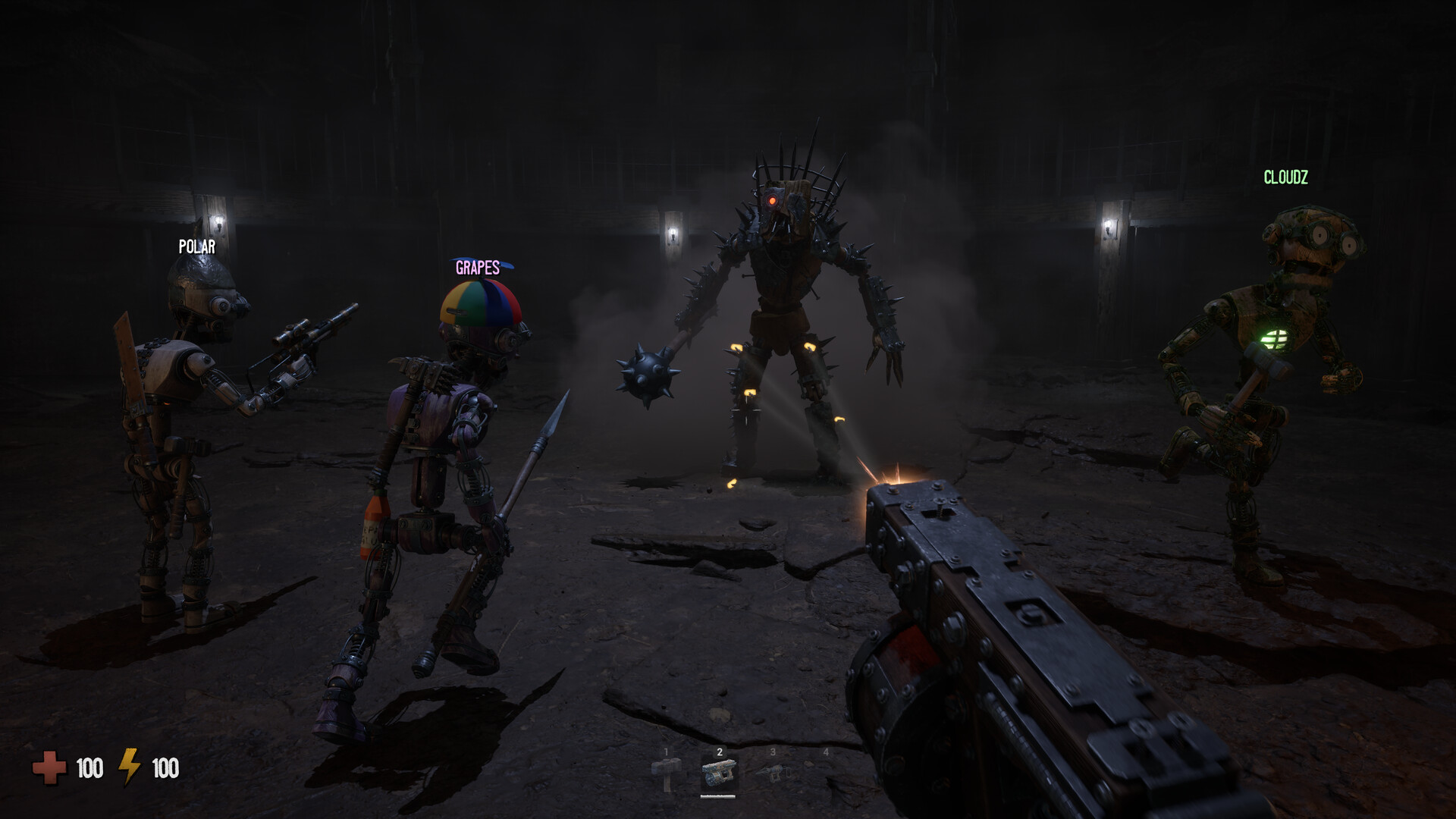
Player Limit vs Recommended Crew
No fixed numeric player limit is publicly confirmed. The official FAQ recommends around four players for the current balanced online co-op experience.
Around four is a recommendation, not a confirmed hard maximum.
Officially confirmedThe current official guidance for balanced online co-op.
Officially confirmedChoose the Right Lobby Mode
Use the in-game public server browser.
Hosts can use lobby management tools when needed.Officially confirmedJoin through Steam or a normal Steam invite.
Patch 1.07 expanded how friends of players in the server can join.Officially confirmedUse an invite instead of public discovery.
Mode is officially listed; exact envelope interaction is player-tested and version-sensitive.Officially confirmedNot confirmedJoining and invitations are blocked while private.
Private mode is officially listed; exact join and invitation blocking behavior is community/player-tested and version-sensitive.Officially confirmedNot confirmedSolo, Duo, Trio or Around Four?
Solo
SupportedMore demanding according to the official FAQ.
Officially confirmedDuo
Small-team co-opExact difficulty scaling is not confirmed.
Not confirmedTrio
More role coverageExact difficulty scaling is not confirmed.
Not confirmedRecommended
Balanced co-op targetCurrent official guidance, not a hard limit.
Officially confirmedStart a Co-op Session
- 01
Open Multiplayer
Start from the current multiplayer menu and choose to host or browse.
- 02
Choose Privacy
Select Public, Friends Only, Invite Only or Private.
- 03
Set Session Rules
Review Max Player Count, host settings and password protection where available.
- 04
Invite or Browse
Invite through Steam or use the public server browser for an open lobby.
How Multiplayer Changed After Launch
- August 10, 2026Patch 1.04
Added lobby privacy, Max Player Count, View Lobby, microphone controls, kick and ban tools.
- August 12, 2026Post-launch roadmap
Described the public lobby browser as a feature being tested while Friends Only and Invite Only remained available.
- August 12, 2026Patch 1.07
Added public server browsing, more host settings, password-protected servers and updated friend-joining rules.
How Many Players Can Join a GRAIN ROT Lobby?
GRAIN ROT supports both solo play and online co-op. The official FAQ recommends a crew of around four players for the current balanced experience. That recommendation is useful planning guidance, but it is not a published hard player limit.
The official sources reviewed do not give the highest numeric lobby capacity. They do confirm that the game includes a Max Player Count setting, so the active setting in the current version is the practical reference before a group starts. Check that menu on the build you are playing instead of treating a community number as permanent.
This distinction matters for searches about “max players.” A recommended crew describes the balance target, while a capacity setting controls a particular lobby. Until an official source names its highest value, the exact maximum remains unconfirmed.
What Does Max Player Count Mean?
“Around four players” is the official recommendation for balanced co-op. A technical maximum would be the highest number the game can support. A lobby’s Max Player Count is the host-facing setting that applies to the session being created.
Patch 1.04 confirmed that Max Player Count is among the lobby tools. Its published notes do not state the setting’s highest number. That means the patch verifies the control without establishing a fixed global cap.
Keep those three ideas separate when choosing a group. A host can review the current setting, while the FAQ offers the recommended crew size. Neither source lets this guide turn around four into a guaranteed ceiling for every version or server.
How Do Public Lobbies Work?
Patch 1.07 added an in-game Public Server Browser. Players can use it to find and join open player-hosted public servers. The earlier FAQ’s Steam-lobby description reflects information from before public browsing was added, so it should be read as historical context rather than the current public-lobby flow.
Public access is different from automatic random matching. The documented feature is a browser where players select an available public server, not an automated queue that fills a group for them. Server availability and the choices a host makes can therefore shape what appears to joiners.
Friends Only and Invite Only are separate access choices. Those paths use Steam friends or invitations instead of public discovery. They are still organized joining methods, not a system that automatically matches strangers into a crew.
How to Invite Friends
For Friends Only, start from the current multiplayer menu and use the Steam friends path for people you know. Invite Only sessions use a Steam invitation for the intended player. Both options keep entry more controlled than a public server while still relying on the game’s current lobby rules.
A player-tested community method describes an in-game desk-envelope interaction for sending or accepting an invite. Treat that interaction as version-sensitive, because menu layout, labels, and button prompts can change with updates. Steam’s friends list and normal Steam invitations are the more stable concepts to look for.
Before a run, have everyone confirm that they can see the intended lobby or invitation on the same current game version. The available sources do not provide a complete diagnosis for every failed invite. If the interface differs from this description, follow the live menu and the latest official patch information.
Kick, Ban and Password-Protected Servers
Patch 1.04 added View Lobby, microphone-volume controls, and Kick and Ban tools. These are host-management features for an active lobby, not evidence of a particular player limit. They give a host ways to review the room and respond when a participant is disruptive or no longer wanted.
Patch 1.07 added password-protected servers alongside more host settings. A password can provide another access layer when a host wants to share a session with a chosen group. Public browsing, friends access, invitations, and passwords are different tools that can be combined according to the current menu.
Do not assume that a kick permanently excludes a player. A kicked player may be able to join again if the lobby remains discoverable and its settings allow it. The precise duration and scope of a ban still need checking in the current version, because the published notes do not define those boundaries.
Does Every Player Need a Copy?
Yes. The FAQ says every player needs their own copy of GRAIN ROT. That is a direct requirement for planning a co-op session, regardless of whether the host chooses Public, Friends Only, or Invite Only.
The available FAQ does not establish Guest Pass eligibility or any Family Sharing permission for multiplayer access. Do not infer either one from the general copy requirement. Check Steam’s live store and account rules if your group needs an answer about a specific sharing arrangement.
Copy ownership is separate from a lobby slot. A group can satisfy the ownership requirement and still need to check the session’s current Max Player Count setting. Keeping those questions separate prevents “everyone owns it” from being mistaken for confirmation of capacity.
Solo, Duo, Trio and Around Four Players
Solo play is supported, although the official FAQ says exploring alone is generally more demanding. A solo player handles every decision and recovery task without another person available to coordinate. That is a coordination difference, not a published numeric difficulty multiplier.
A duo can split attention between immediate tasks, while a trio gives another person to communicate with and cover work. These are practical coordination observations rather than claims about exact balance values. The reviewed sources do not publish a difficulty table for two or three players.
Around four players remains the official recommendation for the current balanced online co-op experience. It offers the clearest published target for a group that wants shared coverage and communication. It should not be read as a fixed technical maximum or a promise of a particular difficulty percentage.
What Is Still Not Confirmed?
The reviewed official sources do not publish a fixed highest numeric player limit. They also do not confirm mid-session joining, reconnect behavior after a disconnect, host migration, or cross-platform play. Each of those features requires details beyond the stated solo, co-op, lobby, and browser facts.
Exact difficulty scaling is also unconfirmed. The FAQ supplies a recommendation and says solo exploration is more demanding, but it does not assign precise multipliers to solo, duo, trio, or larger crews. A stable numerical comparison cannot be derived from that wording.
Check current patch notes and the live lobby interface before relying on a version-specific behavior. This guide can verify that Patch 1.04 added Max Player Count and moderation tools, and that Patch 1.07 added public browsing and password-protected servers. It cannot responsibly fill the remaining gaps with fixed numbers, roles, redemption codes, or unverified screenshots.
GRAIN ROT Player Limit FAQ
Does GRAIN ROT have public lobbies?
Yes. Patch 1.07 added public servers that players can join through an in-game browser. Friends Only and Invite Only options also remain available.
What is the GRAIN ROT lobby size?
The game includes a Max Player Count setting, but the official sources reviewed do not publish its highest numeric value. Around four players is the official balance recommendation.
How do I invite friends in GRAIN ROT?
Friends can join through Steam and Friends Only or Invite Only sessions. A community post also documents an in-game desk envelope, but that exact interaction is version-sensitive.
How many players can play GRAIN ROT?
GRAIN ROT supports solo play and online co-op. The official FAQ recommends around four players for the current balanced experience, but it does not publish a fixed hard maximum.
What is the GRAIN ROT player limit?
GRAIN ROT does not have a publicly confirmed fixed numeric player limit. The official FAQ recommends around four players for the current balanced online co-op experience.
What is the GRAIN ROT max player count?
A fixed maximum is not officially published. Around four players is the current recommendation, not a confirmed hard cap.
Is GRAIN ROT limited to four players?
Four is not confirmed as a technical limit. The official wording describes around four players as the best-balanced current experience.
Can more than four players join GRAIN ROT?
The official FAQ says the game supports as many survivors as the players' setups can handle, but it does not publish a fixed maximum or guarantee balance above around four.
Can I play GRAIN ROT solo?
Yes. Single-player is supported, although the official FAQ says solo exploration is generally more demanding.
Does every player need a copy?
Yes. The official FAQ states that every player needs their own copy of GRAIN ROT.
Official facts are separated from community observations. Version-sensitive details are marked as 待确认.
https://store.steampowered.com/app/4450620/GRAIN_ROT/
https://steamcommunity.com/app/4450620/allnews/
https://www.reddit.com/r/GRAINROT/comments/1vhlfpe/grain_rot_faqs/
https://www.reddit.com/r/GRAINROT/comments/1vms62u/public_lobbies_added_to_grain_rot/